


The Fastest Way to Learn Data Entry Online: A 10-Day Accelerated Roadmap (2025 Guide)
Let’s be honest: in 2025, the idea that data entry is just “mindless typing” is a myth that keeps people unemployed. In my experience coaching freelancers over the last five years, I’ve seen a massive shift. The days of simply transcribing text from a PDF into Word are fading. Today, data entry is about Information Management, speed, and knowing how to leverage AI.
The market reflects this urgency. According to Verified Market Research (July 2025), the Data Entry Service Market was valued at $35.0 Billion in 2024 and is surging toward a projected $60.5 Billion by 2032. That is massive growth, and it’s creating a vacuum for skilled workers.
You don’t need a four-year degree to grab a slice of this pie. You don’t even need months of training. What you need is a hyper-focused strategy. This guide isn’t about teaching you how to type A-B-C; it is the fastest way to learn data entry online by mastering the specific workflows 60% of remote employers are hiring for right now.

To get hired in 10 days, you must master three pillars: Mechanical Speed (50+ WPM), Software Proficiency (Excel/CRMs), and AI-Assisted Cleaning (The 2025 Differentiator).
Phase 1: Mastering Mechanical Speed & 10-Key Accuracy
Before we dive into complex software, we have to address the elephant in the room: your fingers. In the world of data processing, time is literally money. If you are typing at 30 words per minute (WPM), you are statistically unhirable for premium roles.
Why 50 WPM is the “Gold Standard” for 2025
Many beginners ask me, “How fast do I really need to be?” The answer has evolved. According to a January 2025 report by DesignRush, general data entry roles now strictly require 50–60 WPM as a baseline filter. However, if you are eyeing high-paying niches like legal or medical transcription, the bar jumps to 80+ WPM.
But here is the secret sauce that most generic guides miss: Alphanumeric vs. 10-Key typing.
The 10-Key Advantage
Most remote data entry jobs involve heavy numeric entry—invoices, spreadsheets, and financial records. Using the top row of numbers on your keyboard is inefficient. You must master the 10-key number pad (the calculator-looking pad on the right side of full-size keyboards).
I can’t tell you how many times I’ve seen a candidate fail a practical assessment because they were hunting and pecking numbers. Proficient 10-key entry creates a rhythm that allows you to input financial data without looking at your hand.

Phase 2: The “Big Three” Software Stack (Excel, Sheets, and CRMs)
Once your fingers are flying, you need to know where to put that data. In 2025, if you are manually typing things that could be automated, you are doing it wrong.
Essential Excel Shortcuts That Cut Time by 40%
Microsoft Excel remains the king of data entry. But knowing how to open a spreadsheet isn’t enough. You need to know the shortcuts that signal to an employer, “I am a pro.”
- Flash Fill (Ctrl + E): This is magic. If you have a column of full names and need to separate them into First and Last names, you type the first one, hit Ctrl + E, and Excel detects the pattern and does the rest.
- Paste Special (Ctrl + Alt + V): Crucial for stripping formatting from messy data sources.
- Pivot Tables: You don’t need to be a data analyst, but you must know how to summarize large datasets quickly.
Managing Cloud-Based Databases (CRM Data Management)
The modern file cabinet is the CRM (Customer Relationship Management) system. As of March 2025, the Data Entry Institute reports that over 60% of Data Entry Specialists work remotely, often logging directly into platforms like Salesforce or HubSpot.
You don’t need to be a developer, but you need to understand the concept of a “record,” a “lead,” and how to de-duplicate contacts. Employers want to know that you won’t accidentally delete their client list.
Phase 3: The 2025 Edge: AI-Assisted Data Entry & Automation
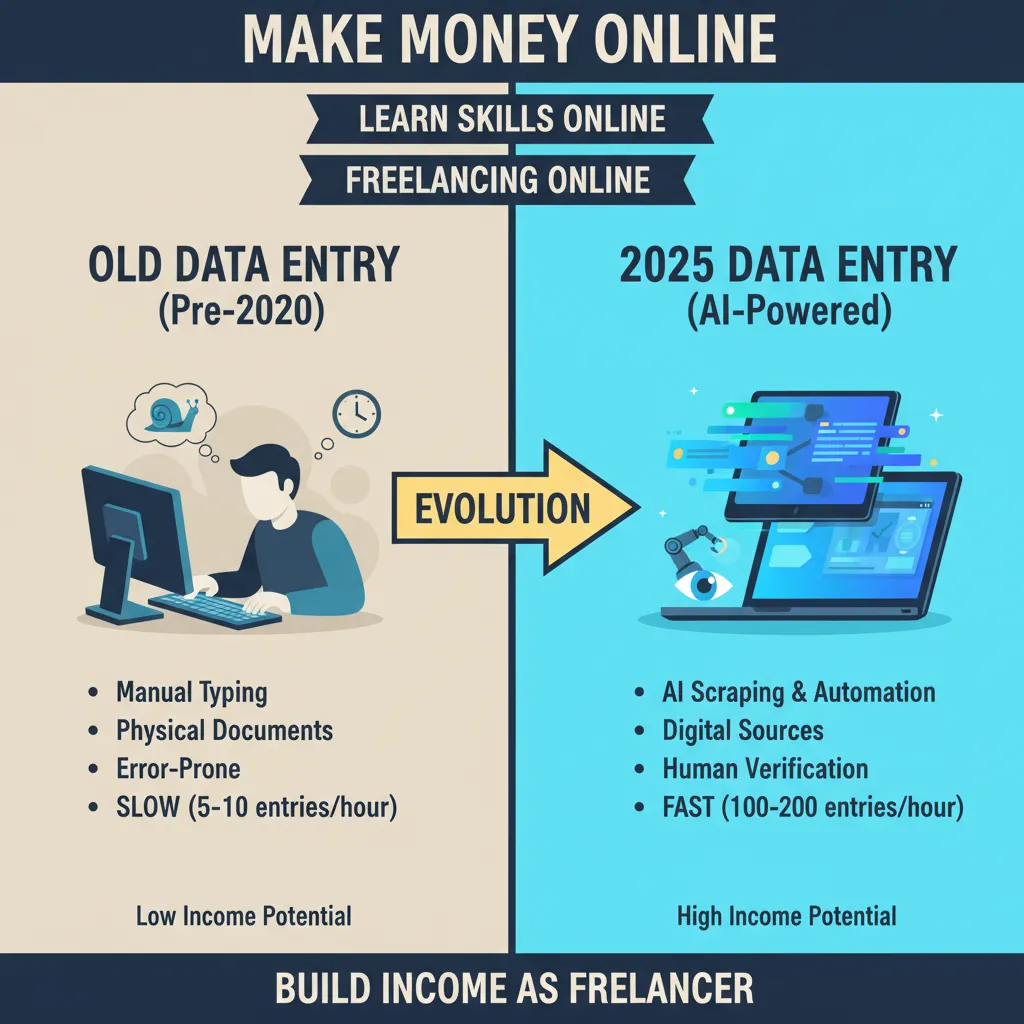
This is where the game has changed entirely. If you are reading articles from 2022, they are outdated. Today, the fastest way to learn data entry involves learning how to supervise AI.
Using OCR and AI for “Dirty Data”
Imagine a client sends you 500 PDF invoices and wants them in Excel. The “old way” was typing them one by one. The “fast way” is using OCR (Optical Character Recognition) tools to scrape the text, and then using AI tools like ChatGPT or Microsoft CoPilot to clean the formatting.
The Data Quality Specialist Role:
The fear that AI will replace data entry is only half-true. It replaces bad data entry. According to DocuClipper Research (March 2025), human data entry has an error rate of 1% to 4%, whereas automated AI systems reduce this to 0.01%. Your job is now to be the human-in-the-loop who verifies the AI’s work.
The 10-Day Accelerated Learning Roadmap
You want the fastest way to learn? Here is your exact schedule. Commit 2 hours a day for the next 10 days.
Days 1-3: Mechanical Speed
Goal: Hit 45 WPM.
Action: Use Keybr.com for touch typing and dedicated 10-key drills. Focus purely on accuracy; speed comes naturally.
Days 4-6: Excel Immersion
Goal: Master Data Cleaning.
Action: Learn VLOOKUP, XLOOKUP, and Flash Fill. Download “messy” sample datasets and practice formatting them into clean tables.
Days 7-8: The AI Workflow
Goal: Learn to use tools.
Action: Practice using ChatGPT to extract data from text. Learn the basics of Zapier for connecting Google Sheets to email.
Days 9-10: Portfolio & Niches
Goal: Job Readiness.
Action: Create a portfolio showing a “Before/After” data cleaning project. Apply to 5 jobs on Upwork emphasizing “Data Scrubbing.”
Strategic Job Hunting: Where the Money Is
Don’t just look for “data entry” on Indeed. That’s where the low-paying scams live. To earn a living wage, you need to target specific industries.
Salary Benchmarks for 2025
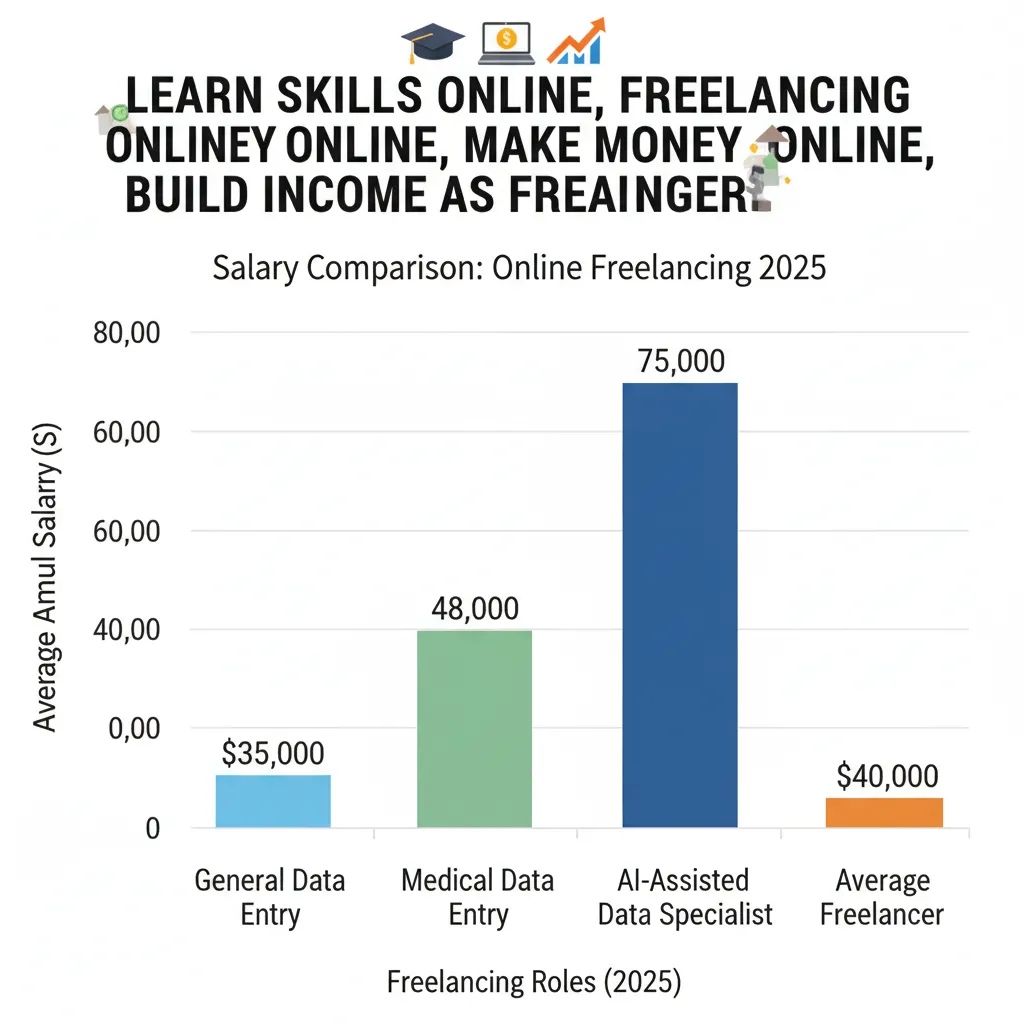
Knowing your worth is critical. As of December 1, 2025, Salary.com reports that the average salary for a Data Entry Clerk I in the U.S. is $39,286 (approx. $19/hour). However, specialists with CRM and AI skills often command $25-$30/hour.
High-Paying Niches
- Healthcare (HIPAA Compliance): This requires knowledge of patient privacy. A mistake here is costly, so they pay for accuracy.
- Logistics & Supply Chain: As shown in a case study by GetStellar.ai (Dec 2024), retailers like XYZ Retail adopted AI inventory systems to achieve 98% accuracy. They need humans to manage these complex databases.
- Legal Transcription: Requires excellent listening skills and 80+ WPM typing speeds.
FAQ: Common Questions for Beginners
Is data entry still in demand in 2025?
Absolutely, but the role has shifted. As Charles Lamanna from Microsoft noted in Fast Company (Jan 2025), we are moving toward “teams of agents” working for us. Companies need humans to feed, clean, and verify the data that AI agents use. The demand is for data quality, not just typing.
Can I do data entry on a tablet or phone?
Honestly? No. While some “micro-task” apps exist, professional data entry requires a keyboard, often dual monitors, and desktop software like Excel. Trying to do this on a phone is a recipe for error and low wages.
Do I need a certificate?
Certificates from Coursera or LinkedIn Learning help, but a portfolio is better. Show a potential employer a video of you taking a messy PDF and turning it into a clean Excel sheet in 5 minutes using AI tools. That wins over a certificate every time.
Conclusion: Your Next 24 Hours
The fastest way to learn data entry online isn’t about finding a magic button; it’s about disciplined skill acquisition. The market is growing toward $60 billion, but it’s leaving behind the “hunt-and-peck” typists. It is rewarding those who treat data entry as a technical skill.
Your immediate next steps:
- Take a typing speed test today to establish your baseline.
- Open Excel and watch one tutorial on “Flash Fill” and “Power Query.”
- Decide on your niche (Medical, Legal, or General Business).
In 2025, data is the new oil, and the people who know how to refine it are the ones who get paid. Start your 10-day roadmap today.
